

Why Cinema 4D Artists Should Care About ACES Color
ACES is a color work space that helps you get a realistic film look when you render. Learn how dial in your color using this revolutionary workflow.
Chad Ashley from Greyscalegorilla gives you an intro to ACES and shows you how it makes color so much easier to manage at every level of production.
This snippet preview lesson is an inside look to the Getting to Know ACES training series, streaming now only in Greyscalegorilla Plus.

Getting to Know ACES and ACEScg
Hey, what’s up everybody? In this video, we’re going to talk all about ACES. So what the heck is ACES? Well, ACES stands for Academy Color Encoding System.

Now it really is a system, but it’s also a lot more than that. And we’re going to talk all about what that stuff is here in a minute. Let’s start a little bit further back.
So ACES began by the same group, the Academy that brought you the Oscars as a way to create a consistent way for companies across the motion picture industry to deal with color.

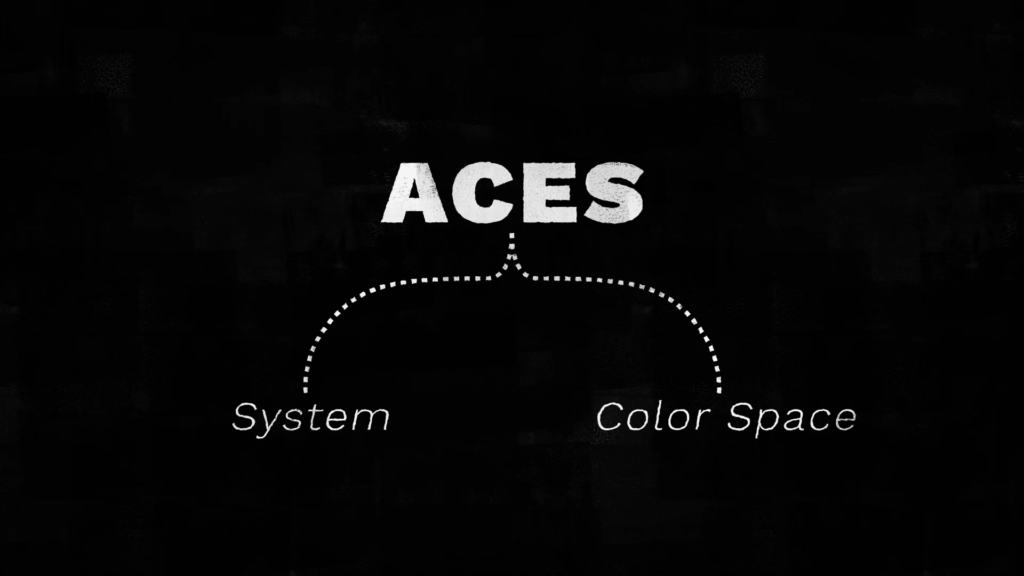
The residual sort of benefit for us is ACES CG, which we’re gonna talk about in a minute. The easiest way to think about ACES is to sort of break it down into two different categories. There’s ACES, the system, and then ACES, the color space.
ACES – The System
So let’s talk about ACES the system first, it was designed as a way to consolidate and simplify the color management process for feature film.But it also has benefits that reach far beyond that. So think of ACES as just a way of working with different formats and you would bring in all these different multiple capture formats, work in ACES, and then be able to put them out again into the world in different various formats.
I like to think of this as sort of like an air lock. You have an air lock and in that air lock is ACES. Anything that’s coming into that air lock then becomes basically a, it gets normalized to that, let’s say air pressure or something. And then everything that comes out could go anywhere, right?
So it’s really this like in between color space management system, right? And what they use is they use these things to come in and out. They call them input device transforms and output device transforms. So you can transform any capture device into ACES using an IDT input device transform.

And then you could go back out again to any format that you want, whether it’s REC709 or maybe you’re going back out to film. And those are output device transforms ODTs. So everything in the middle, you’re working in ACES. Okay. So that’s ACES, the system.
ACES – Color Space
So let’s talk about ACES, the color space. Believe me, I’m going to preface this by saying there are a lot of people way smarter about the color science stuff than I am now. ACES CG is a wide gamut color space that was designed specifically for doing 3D rendering, right? It is a broader color range, wider gamut than SRGB.
That means that there’s many more colors available to you than you do. Then you typically get an SRGB. now what that means is that you’re going to be able to push that duration much, much further. You’re gonna be able to push light intensity much, much further. And when you have a color space that reacts more like film, you’re able to really push your lighting a lot further. Intensities can get brighter, therefore giving you a little bit more energy in your indirect bounce lights in GI, right? Also, it has a really filmic response curve.
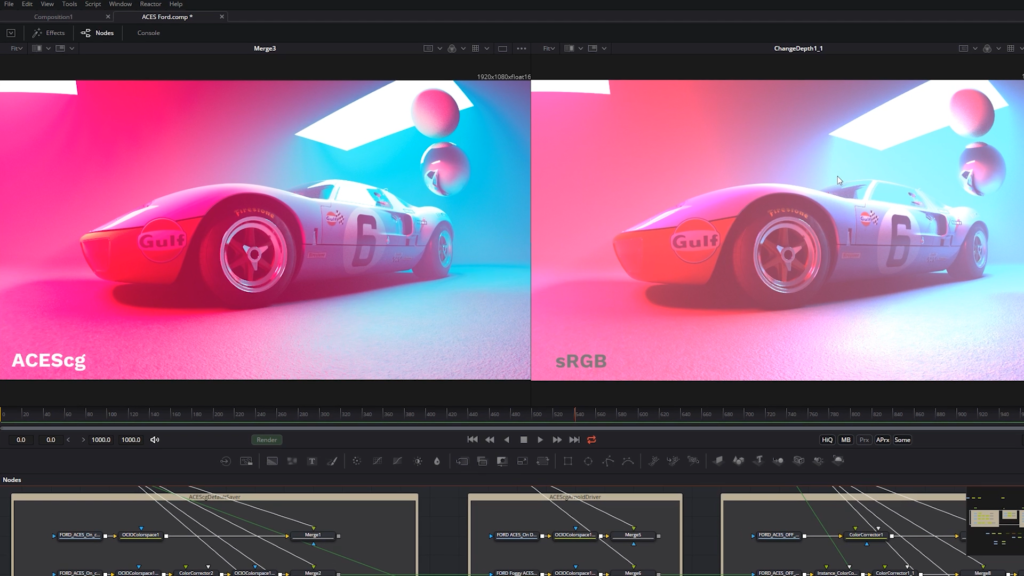
It sort of reacts very like film. If you start to blow out the image, it’s not like a linear brightness like the entire image is getting brighter. You can really see it. It looks like you’re exposing film when you bring the intensity up of a light or maybe your camera exposure in ACES CG. Uh, you can also like push saturation really, really far.
There’s a great article that Chris Brejon wrote about how when they made the Lego Batman movie, he walked into the studio that was making that film and saw some really bright saturated Lego image. And he thought to himself like, how the heck are they getting these colors to blend like this without it haloing without it fringing and that’s because they were working in ACES.
So for instance, let’s say you have a background plate that was shot in log and you need to put a 3D render on top of that background please and then spit it back out for comp. Right? So normally in a normal workflow you might have to pre-convert that log footage into a color space that you’d be working with in comp. So you’d have to pre-convert that footage, bring it into CG, try to match it as best you can, then spit out a linear EXR for the comper to try to like fudge and make it look like it’s sitting in the plate. Right.

Well the beauty of what ACES does is it sort of like it levels the playing field for all capture devices. So if you have a log C footage and you bring it into, let’s say Cinema 4D with Arnold, you can use an input device transform and say, well, I know this footage was log and I’m going to bring it into ACES CG. And you literally can set this little converter. It’s color space, but you’re, you’re almost doing a little conversion on it before it goes into your scene.
So once you’ve put your IDT or input device transform on it, now you’re working in ACES CG. You can put your 3D on there, your renderings and all that stuff is in ACES CG so that when you go back out to comp, the comper knows, Oh, this came from ACES CG. Cool. Oh and I have that log footage too that I’m going to use.
So that came in as log. I’m also going to bring that into ACES and now I’m going to comp everything and then I can go back out to anything. I can go to REC709, I can go to SRGB, I can go to REC2020, I can go out to film. So ACES, the system allows you a unified place, a simplified place to deal with color and formats. Now, one drawback is currently the renders that that support ACES are pretty limited when it comes to Cinema 4D.
Cinema 4D doesn’t support Open Color IO, which you definitely need to be able to load the proper ACES configuration file. But luckily Arnold actually does. So a lot of our ACES training, we’re going to be showing you how to work with it in Arnold because that’s the one render that sort of supports the workflow from beginning to end.

Over in Greyscalegorilla Plus, we’re going to show you how to set up a scene in ACES. We’re going to show you the benefits of ACES compared to let’s say, a tone mapper or a LUT. And then we’re going to show you how to comp in ACES really briefly in fusion show you how to bring in a 3D render with footage and have it all married in ACES and then out out to whatever you want really.

Getting to Know ACES Training Series – Greyscalegorilla Plus
So it’s sort of like this mini series, a set of videos to try to get you up and running, or at least understanding the benefits and what ACES really is. So I hope you enjoy the Greyscalegorilla Plus videos and I encourage everybody to go and learn more, learn as much about ACES as you want. We’re going to drop lots of interesting links below, so happy learning and I’ll see you in the next one.
More ACES Resources to Study
- CG Cinematography ACES – Chris Brejon
- Color Grading: What is ACES? – Michael Maher
- ACES Central
- Getting to Know ACES Training Series – Greyscalegorilla Plus
- Why Every Editor, Colorist, and VFX Artist Needs to Understand ACES – Frame.io
- ACES – Oscars


